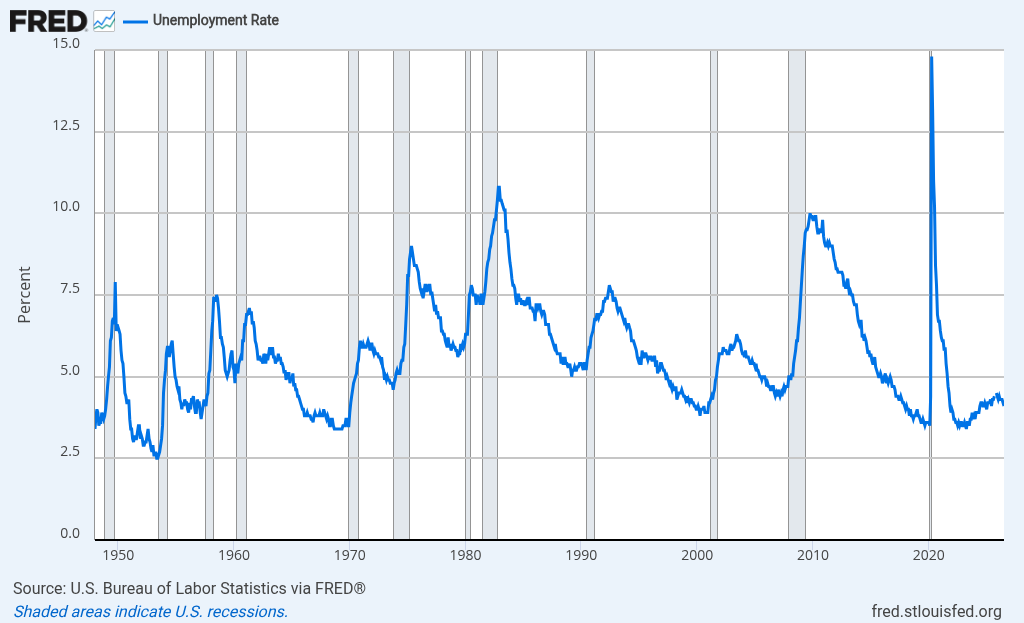
Unemployment Rate
Give the reader the unemployment chart and a direct link to the FRED series so they can inspect its definition and observations.
Inspect original source ↗Inspect evidence record ↗Public domain; citation requested
Retrieve a chart or table through one search request, then show it with its source in your own research brief, company note or agent answer. Your users stay in your product.
Available today: a public, read-only hosted search endpoint for the deployed public index. Accounts, prepaid credits, and hosted MCP share the public index. Private ingestion and local CLI tools still require a local workspace. Platform listings are subject to review.
POST /v1/searchYour agent retrieves candidates. Your application can display a suitable visual with its source and context in a brief, company note or research card.
“Show the official U.S. unemployment chart alongside a macro research brief.”
Your agent calls Evidence/v1/search{
"query": "FRED UNRATE",
"corpus": "macro-public-data",
"candidateLimit": 3
}Choose a candidate that fits the question, then use the returned image URL and source fields in your interface.
Try this exact search →Give the reader the unemployment chart and a direct link to the FRED series so they can inspect its definition and observations.
assetUrltitle + publishersourceUrlrights + metadata.provenanceSelected fields from one indexed candidate. Source URLs and visuals are real; the product layout is illustrative.
{
  "results": [
    {
      "id": "asset_fred_unrate",
      "title": "Unemployment Rate",
      "publisher": "Federal Reserve Bank of St. Louis · FRED",
      "document": "FRED · UNRATE",
      "assetUrl": "https://evidence8.com/evidence/fred-unrate.png",
      "sourceUrl": "https://fred.stlouisfed.org/series/UNRATE",
      "date": "2026-08-23",
      "rights": "Public domain; citation requested",
      "assetMode": "cached",
      "metadata": {
        "provenance": {
          "publisher": "Federal Reserve Bank of St. Louis · FRED",
          "sourceUrl": "https://fred.stlouisfed.org/series/UNRATE",
          "document": "FRED · UNRATE",
          "page": null,
          "publishedAt": "2026-08-23",
          "acquiredAt": null,
          "sourceDateRange": null
        }
      },
      "recordUrl": "https://evidence8.com/v1/assets/asset_fred_unrate"
    }
  ]
}
Check the match, reporting period and publisher's reuse terms before displaying a visual. Retrieval credits do not grant content licences. These examples use the existing search API.
A text answer and source link may leave someone to find the right chart, series, and period by hand.
The response can include an asset, FRED series ID, source page, data link, description, and recorded rights label. The analyst still decides which result fits.
Send a JSON request to the public endpoint to retrieve candidates from the public index. Run the workspace locally when you need private or locally ingested evidence.
Check the corpus counts in the deployed public index manifest.
GET /evidence-index-manifest.jsonSend a query and optional corpus slug to the hosted read-only endpoint.
POST /v1/searchShow the visual alongside its source link and available context; let the analyst choose whether it fits.
Read the API reference →